
Pocketalk Plus Translator Review: A Trusted Companion for Global Conversations
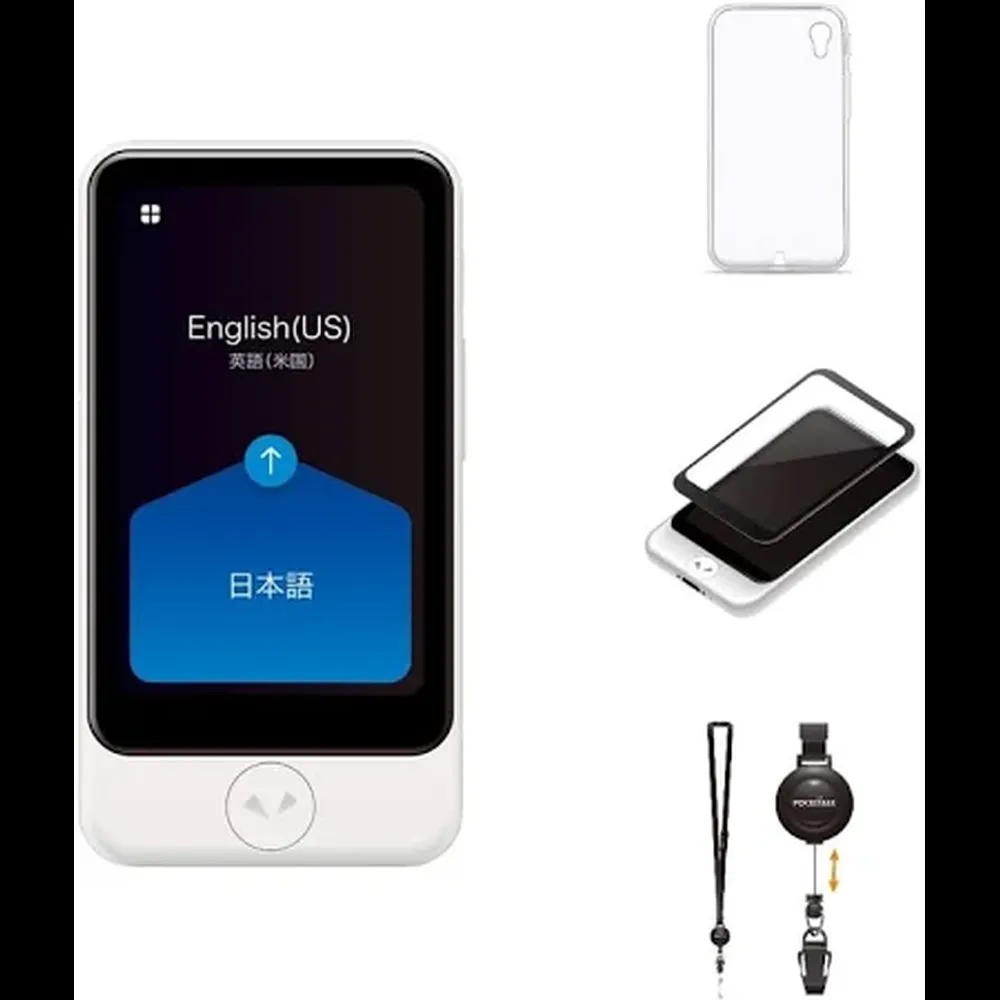
The Pocketalk Plus translator is a upper mid-range two-way AI translator built for serious travelers, business professionals, and multilingual households. With support for 82 languages, a large 4-inch touchscreen, and a camera for text translation, it’s one of the most comprehensive standalone devices in the category.
Unlike phone apps that rely on multiple taps and Wi-Fi guesswork, the Pocketalk Plus offers real-time speech translation with a dedicated interface and dual microphone system. What sets it apart is the inclusion of a two-year global data plan — built right in — allowing users to access cloud-based translations in over 130 countries without needing a SIM card or Wi-Fi connection.
Its AI is designed to handle accents, slang, and fast speech with impressive fluency, though offline functionality is more limited compared to some competitors. Still, with strong battery life, a loud speaker, and a durable frame, the Pocketalk Plus isn’t just smart — it’s travel-proof.
For users who want a powerful, plug-and-play translator without fiddling with apps or phone settings, the Pocketalk Plus translator offers a refined experience backed by a strong reputation.
MSRP (when available or best estimate): $349.99
Price: Check Price on Amazon
✅ Pocketalk Plus Translator Pros
✅ Supports 82 Languages with Two-Way Voice Translation
Covers a broad global range with real-time speech recognition and playback.
✅ Built-In Camera for Text Translation
Translates signs, menus, packaging, and documents via on-device OCR — no additional app needed.
✅ Includes 2-Year Global Data Plan
Works in over 130 countries with no SIM card or subscription required.
✅ Large 4-Inch Touchscreen
Easy to navigate and read, even in bright daylight.
✅ AI Handles Accents & Slang Well
Adaptive engine improves with repeated use, making it more fluid over time.
✅ Clear, Loud Speaker
Voice translations are easily audible in outdoor or noisy environments.
✅ Durable Build with Gorilla Glass
Withstands bumps, drops, and travel abuse.
✅ Simple Setup and App-Free Operation
No smartphone required to use core features.
❌ Pocketalk Plus Translator Cons
❌ Offline Mode Is Limited
Most translation features require internet access, with minimal offline capability.
❌ Camera Translation Can Lag Slightly
Processing takes a second or two, especially on longer or stylized text.
❌ No Earbud or Headphone Support
Public audio playback only, which may not suit private situations.
❌ Touchscreen Input Can Be Clunky
Onscreen typing is slow compared to phones, especially for manual corrections.
❌ No App Integration
No real-time sync or storage of conversations like some competitors offer.
❌ Upper Mid-Range Price Point
Premium build and features justify it, but it’s pricier than many alternatives.
Key AI-Powered Features
Pocketalk Plus Translator
- Real-Time Two-Way Voice Translation - Supports 82 languages with AI-enhanced interpretation that adapts to slang, tone, and regional accents.
- Visual Text Recognition via Built-In Camera - Translates printed text, signs, and menus using OCR and contextual AI to preserve meaning.
- Cloud-Based Neural Translation Engine - Provides high-accuracy results by accessing constantly updated language models.
- Automatic Language Detection - AI identifies the spoken language without requiring manual selection — ideal for multilingual settings.
- Noise-Canceling Dual Microphones - Focuses on the primary speaker and reduces background noise for clearer recognition.
- Smart Phrase Memory - Stores recent translations for quick access and review during ongoing conversations.
- Translation Speed Optimization - Uses network latency and speech cadence to adjust delivery speed for smoother interaction.
How Smart is the AI?
Pocketalk Plus Translator
The Pocketalk Plus doesn’t just translate words — it understands how people talk. Its AI engine leverages a cloud-based neural network that processes speech in full sentence structures, not just word-for-word conversion. This leads to far more natural, conversational results than you’ll find in older or app-only translators.
One of the device’s standout strengths is its ability to handle slang, idioms, and varying accents. Whether you're dealing with fast-paced Spanish in Madrid or regionally accented English in Mumbai, the device tends to keep up — a testament to its machine learning-driven adaptation. The AI improves with use, too. Frequent phrases and languages you use regularly seem to get more fluent over time, almost like the device is learning your habits.
The camera OCR (optical character recognition) is another smart integration. It doesn’t just scan and convert words from signs or menus — it applies contextual logic to determine the best phrasing. For example, it won’t translate "entrée" literally as "entrance" on a French menu — it’ll give you the correct culinary meaning instead. That kind of nuance makes a huge difference while traveling.
The one caveat? It’s heavily reliant on online connectivity to access this level of intelligence. Offline, it loses a lot of that fluidity, reverting to more rigid phrasing. There’s no built-in local AI model for fallback, which is disappointing at this price point.
Still, when connected, the AI is among the smartest in the game — not just translating but interpreting with real-world accuracy and cultural fluency.
Performance & User Experience
Pocketalk Plus Translator
Translation Speed & Accuracy
The Pocketalk Plus delivers impressively fast and accurate translations, especially in online mode. Thanks to its cloud-powered neural engine, the device typically returns results in under one second — even when processing longer sentences. This makes it ideal for fluid, back-and-forth conversations in real time.
Accuracy is where Pocketalk really shines. It goes beyond literal word swaps, preserving context, emotion, and tone in most cases. Whether you’re translating formal business greetings or casual street slang, the output feels natural — often as though a bilingual speaker is standing between you and your conversation partner.
One of its key differentiators is its strength in both directions of translation. Some devices do well going from English to another language, but struggle in reverse. Pocketalk handles both directions equally well, making it a true two-way translator.
It also performs well across a variety of language pairs — from common ones like English-Spanish to trickier combinations like Japanese-French or Arabic-Portuguese. That said, some users report minor hiccups when dealing with very niche dialects or uncommon idioms.
The built-in camera adds another layer to the translation game. It’s not instantaneous — expect 1–3 seconds for image processing — but the results are surprisingly accurate. Whether you’re pointing it at a train schedule, a handwritten label, or a multilingual sign, the device interprets printed content with a strong success rate.
In all, Pocketalk Plus earns high marks in both speed and linguistic fidelity — a top-tier performer in its class.
App & Setup Experience
One of the strongest aspects of the Pocketalk Plus is how little setup it actually requires. Out of the box, it’s nearly ready to use. Turn it on, select your language, and connect to Wi-Fi — that’s it. There's no account registration, no forced app installation, and no long tutorial sequence. It’s clearly built with non-tech-savvy users in mind.
What truly sets it apart is the inclusion of a built-in global data plan, which means you can start translating without needing to tether to your phone or hunt for a hotspot. The device supports over 130 countries with its own cellular connectivity (via eSIM), which drastically reduces setup complexity when traveling abroad.
Unlike other translators that rely on a mobile app for core functionality, Pocketalk Plus works almost entirely on-device. There *is* an optional app, but it’s limited mostly to device management, firmware updates, and exporting saved translations. It doesn’t include live syncing, cloud history storage, or transcription review like some competing platforms offer.
The UI is clean, simple, and touch-optimized. Most users report that the 4-inch screen is large enough for easy navigation, and the icons are intuitive. If you’ve ever struggled with fiddly smartphone apps or layered menus, you’ll likely appreciate how focused and frictionless this experience is.
That said, the lack of app-side features may disappoint power users who want to back up conversations or manage content across devices. But for travelers and everyday users? It’s delightfully low maintenance.
Battery Life & Comfort
Despite being packed with high-end components — a camera, large touchscreen, dual mics, and cellular connectivity — the Pocketalk Plus translator delivers solid battery performance. On a full charge, it offers up to 7 hours of active translation use, and can go several days on standby. That’s enough to get through a full day of sightseeing, meetings, or airport-hopping without reaching for a charger.
The device uses USB-C for charging, and a full recharge takes around 90–100 minutes. While not lightning-fast, it’s efficient enough for overnight charging or quick top-ups during travel breaks. Users especially appreciate the battery indicator’s accuracy — it gives you a clear, reliable forecast of remaining life.
From a design standpoint, Pocketalk Plus is one of the more comfortable handheld translators out there. It weighs just under 130 grams and is slim enough to fit into most pockets or small pouches. The matte texture on the back provides a secure grip, and the curved edges make it easy to hold for extended conversations.
The 4-inch screen is a big step up from many competitors — not just in size, but also in clarity and brightness. It’s responsive to touch and easy to use even in direct sunlight. For older users or anyone with visual impairments, the readability and size are a major plus.
The only downside? It’s slightly larger than some minimalist translators — not bulky, but you’ll definitely feel it more than, say, a Timekettle earbud case. Still, the build quality and ergonomics more than make up for the footprint.
Microphone & Speaker Quality
The Pocketalk Plus translator features a dual-microphone array and a high-output speaker — both engineered specifically for clear, real-time translation in noisy or variable environments. And it delivers.
The microphones are placed on either end of the device, allowing them to isolate speech from different directions. This makes it ideal for natural, two-person conversations. AI-driven noise cancellation works well to filter out ambient sound — a huge benefit when you’re in loud cafés, airports, or busy streets. Multiple users report that the device continues to capture voice input clearly even from 2–3 feet away, and rarely misses short commands or full sentences.
On the output side, the speaker is impressively loud for its size. It projects speech translations with clarity and enough volume to be heard in most public settings. While it won’t compete with high-end audio gear in warmth or dynamic range, it doesn’t need to — its job is to deliver spoken words sharply and reliably, and it nails that.
There’s no built-in audio jack or Bluetooth speaker support, which limits your options for private listening. This may be a drawback for users in quiet environments like hospitals or shared offices, where public audio might feel intrusive.
Still, for everyday use, Pocketalk’s mic and speaker hardware are robust, responsive, and well-calibrated for its mission: making quick, understandable conversation possible — anywhere.
Sound Quality
Pocketalk Plus is designed for speech — and it shows in the way its audio is tuned. While it won’t be winning awards for rich, studio-like sound, it nails its core purpose: delivering translated voices that are crisp, clear, and easy to understand in real-world situations.
The device uses a front-facing speaker with a surprisingly powerful output for its size. Translated phrases are pronounced clearly and without distortion, even at higher volumes. The tonal quality leans toward the mid- and high-range frequencies, which helps emphasize clarity over depth — a smart choice when your primary goal is comprehension, not immersion.
One clever touch is how the AI slightly adjusts playback speed based on sentence complexity. For longer phrases or fast-paced conversations, the device slows output just enough to make it easier for the listener to catch every word. This pacing is subtle, but it enhances usability during real-time interactions.
However, without a headphone jack or Bluetooth output, the sound remains public by default. That’s fine for most travel and casual scenarios, but less ideal for quiet or private environments. Users who want more discretion might find this limiting.
Overall, the sound quality is well-suited to its function: fast, intelligible speech in a variety of settings. It doesn’t try to do too much — and that’s a good thing.
Offline vs Online Mode
The Pocketalk Plus translator is clearly designed to thrive in connected environments. Its translation engine is cloud-based, meaning the vast majority of its intelligence, speed, and nuance comes from online access. Fortunately, it’s one of the few translators that includes a built-in **2-year global data plan**, allowing users to access that cloud power in 130+ countries — without a SIM card or Wi-Fi connection.
When online, the device supports 82 languages with impressively natural translations. Conversations flow quickly, slang is interpreted correctly, and the neural engine does a good job maintaining tone and intent.
Offline mode, however, is more limited. Unlike competitors like iFLYTEK that offer offline language packs with built-in AI models, Pocketalk Plus has minimal offline functionality. It supports **a small set of preloaded phrases** and can still recognize a few essential words or commands, but it’s not suited for full conversations without a connection.
Camera-based translations are also disabled offline, since visual processing relies on cloud OCR and contextual AI to function properly. For travelers heading deep into rural areas or planning to be off-grid, this could be a drawback.
That said, the included global data plan bridges the gap for most users. As long as you’re within coverage, you get full AI functionality — often with better connectivity than your smartphone. But those seeking rich offline features will likely need to look elsewhere.
Bottom line: Online, the Pocketalk Plus translator is a powerhouse. Offline, it’s more of a backup plan than a full solution.
Final Verdict
Pocketalk Plus Translator
The Pocketalk Plus translator is one of the most refined AI translation devices available today. It combines speed, clarity, and simplicity in a durable package that’s clearly designed for real-world travel and multilingual communication. Whether you're chatting in a taxi in Tokyo, navigating a foreign metro system, or translating a restaurant menu on the fly, the device keeps up with ease.
Its real-time speech translation is among the most natural and fluid in its class, and the built-in camera adds a practical advantage for translating printed or written text. The inclusion of global data coverage means you can use it out of the box in over 130 countries — no SIM cards, apps, or subscriptions required.
While its offline capabilities are limited and its app experience somewhat basic, the overall user experience remains highly positive. It’s easy to use, fast, and accurate — which is exactly what you want from a dedicated translation device.
If you travel frequently, do business internationally, or just want a no-fuss, high-performance interpreter in your pocket, the Pocketalk Plus translator more than earns its place in your travel bag.
FAQ
Pocketalk Plus Translator
Does the Pocketalk Plus translator require Wi-Fi or a SIM card?
No. It includes a built-in 2-year global data plan that works in over 130 countries — no SIM card or Wi-Fi needed for most features.
Can it translate signs and printed documents?
Yes. The built-in camera uses OCR to translate menus, street signs, packaging, and other printed material.
Does the Pocketalk Plus translator support offline translation?
Not really. It has very limited offline functionality and works best when connected to the cloud via its internal data connection.
Is the Pocketalk Plus translator easy to use for non-tech-savvy people?
Yes. Setup is minimal and the touchscreen interface is intuitive, with large icons and quick access to key functions.
Can I save or export my translations?
You can view recent translations on the device, but it doesn’t offer cloud sync or in-depth export features like some app-based systems.
Additional Information
Pocketalk S2 Plus Translator ReviewThis review is based on research, expert analysis, and user feedback. AI Reviews HQ does not conduct hands-on product testing. We may earn a commission from the links in this review. We do our best to provide accurate product details, however AI is not perfect and may make some mistakes in research. Please double-check with the manufacturer or retailer before purchasing. Check out the product page