
Motorola Moto Watch 120 Review: Clean Design, Killer Battery — But Where’s the Smarts?
The Motorola Moto Watch 120 is a lifestyle-focused smartwatch that tries to offer a premium look and reliable health tracking at a budget-friendly price. At $139.99, it enters a crowded entry-level space dominated by Amazfit, Fitbit, and Huawei — and it makes a compelling case if you prioritize battery life and design over smart features.
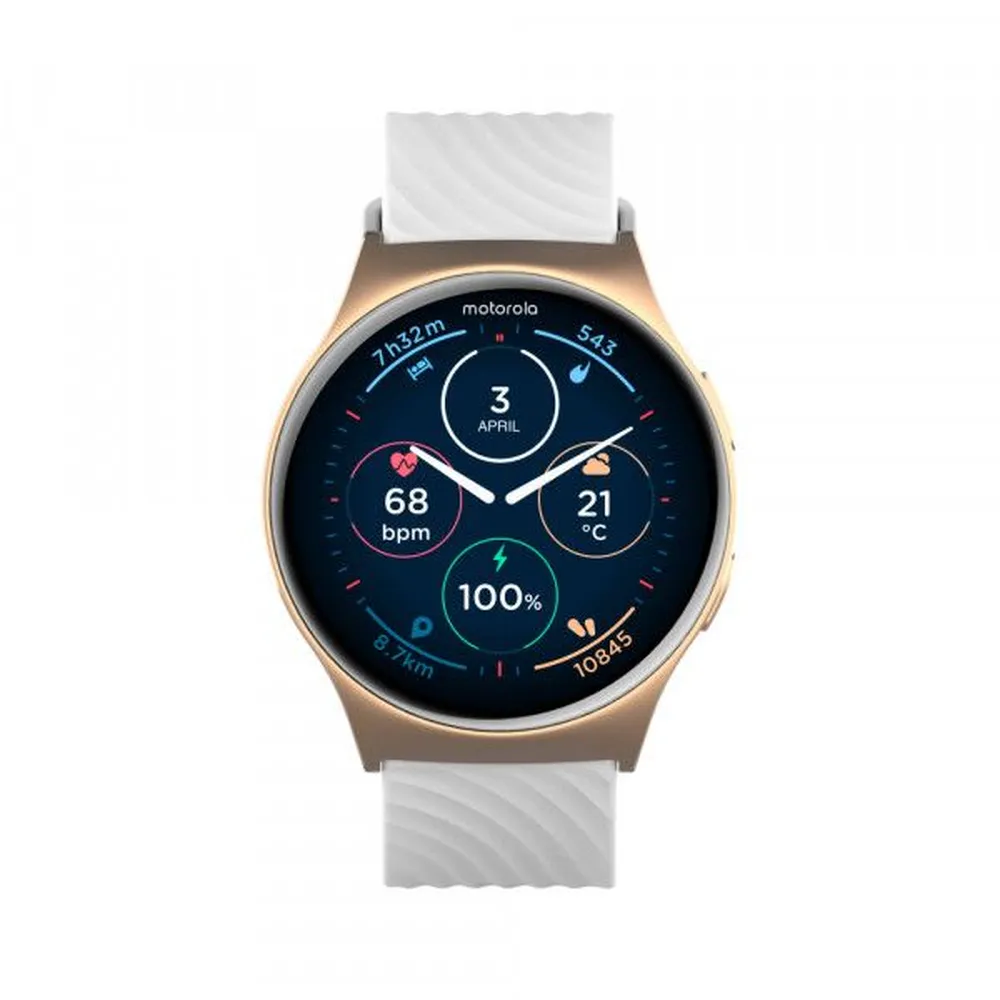
You’re getting a sleek aluminum body, a 1.2-inch AMOLED display, SpO₂ and heart rate sensors, over 100 sports modes, and a clean, minimalist UI. Battery life is one of its standout traits, easily stretching to 10+ days depending on usage.
But the "smart" in smartwatch is where the Motorola Moto Watch 120 stumbles. There's no voice assistant, no third-party app support, and notification handling is basic. The companion Moto Watch app is functional but light on insight compared to what you’d find from Fitbit or Garmin.
In short, this is more of a polished fitness tracker in a smartwatch shell. If your expectations are grounded in long battery life, health basics, and simple elegance — it delivers. If you want rich interactivity or smart ecosystem features, you’ll likely be left wanting.
MSRP (when available or best estimate): $139.99
Price: Check Price on Amazon
✅ Motorola Moto Watch 120 Pros
✅ Polished design
Lightweight aluminum frame and a clean, minimalist aesthetic make it look more premium than the price suggests.
✅ Sharp AMOLED display
1.2" screen with good brightness and color clarity in outdoor light.
✅ Strong battery life
Easily stretches to 7–10 days with typical use, rare at this price point.
✅ Solid core tracking
Covers sleep, heart rate, SpO₂, and step tracking with consistency.
✅ Over 100 workout modes
Good diversity, even if data depth is basic.
✅ Affordable price
At $139.99, it's very accessible for users looking for a simple health companion.
❌ Motorola Moto Watch 120 Cons
❌ No smart assistant
No Alexa, Google, or voice control options at all.
❌ No app store
You’re locked into the built-in functionality with no option to expand.
❌ Basic notifications
You can see them, but no message replies, quick actions, or call handling.
❌ Limited customization
Only comes in one 43mm size, and strap options are minimal.
❌ No onboard GPS
Uses connected GPS from your phone, which may limit outdoor workout accuracy.
❌ Companion app is weak
The Moto Watch app lacks polish, historical insights, and third-party integrations.
Smart Features & Core Tech
Motorola Moto Watch 120
Notifications
Notifications are limited to viewing — no replies, no quick actions, and no call handling. Texts, app alerts, and calendar reminders do appear reliably, but the lack of deeper interaction keeps it firmly in fitness tracker territory when it comes to smart functionality.
Voice & Assistant Support
There is no voice assistant on board. You won’t find Google Assistant, Alexa, or even a basic offline option. This means no voice commands, no hands-free control, and no dictation features.
Connectivity & App Integration
The Motorola Moto Watch 120 connects via Bluetooth 5.0 and relies on your smartphone’s GPS for location-based tracking. There’s no Wi-Fi, no cellular, and no NFC support. It pairs with the Moto Watch app, which offers basic customization and health syncing but lacks any third-party app ecosystem or integration with services like Strava or Apple Health.
Software & Ecosystem
The custom operating system is simple and user-friendly, but it’s closed. You won’t find a Play Store, and you can’t add apps. That makes it more of a polished fitness band than a full-fledged smartwatch in terms of extensibility.
Performance & User Experience
Motorola Moto Watch 120
Health & Fitness Accuracy
The Motorola Moto Watch 120 handles the basics well. Heart rate readings are consistent during light cardio and daily activities, though accuracy drops during high-intensity or strength-based workouts — a limitation common to most entry-level optical sensors. Sleep tracking is surprisingly competent, capturing total sleep time and offering basic stage breakdowns (light, deep, REM), though it lacks sleep scores or coaching features.
SpO₂ readings are available, but only through manual spot checks — there's no passive or overnight tracking. There’s no GPS onboard, so all distance-based activities rely on connected GPS via your smartphone, which can be accurate but adds friction to outdoor workouts. Overall, the fitness sensors are serviceable for casual users, but not precise enough for athletes or data-focused training.
Notifications & App Integration
Notification handling is minimal. You’ll receive text previews, app alerts, and call notifications — but that’s where it ends. There’s no way to reply, dismiss from your wrist, or interact with calls. Notifications show up reliably, but there’s no deeper integration with Android or iOS.
There’s also no third-party app support, and no integration with broader ecosystems like Google Fit, Apple Health, or Strava. You're limited to what the Moto Watch and its companion app provide, which is functional but lacks flexibility. This puts the 120 more in line with a high-end fitness band than a true smartwatch when it comes to smart connectivity.
Smart Assistant & Voice Control
There’s no voice assistant on the Motorola Moto Watch 120 — not even a basic offline option. That means no Google Assistant, Alexa, or Bixby, and no voice commands of any kind. This omission makes the experience feel dated, especially when competitors like Amazfit and Fitbit offer basic voice controls even on mid-range models.
For users hoping to control smart home devices, send messages, or issue quick commands via voice, the Moto Watch 120 offers nothing — and doesn't try to fake it either.
Battery Life
Battery life is one of the Motorola Moto Watch 120’s strongest features. With a 250mAh battery and a lightweight operating system, the watch can stretch between 7 to 10 days on a single charge with typical use. That includes 24/7 heart rate monitoring, sleep tracking, and notifications.
If you turn off background monitoring or reduce screen brightness, you can squeeze out a bit more. The lack of GPS, voice assistant, and third-party apps likely contributes to the extended battery life — fewer power-hungry systems, more uptime. Charging is done via a magnetic puck and takes about 90 minutes for a full charge.
For users coming from daily-charge devices like the Pixel Watch or Apple Watch, this kind of longevity is a welcome change.
Comfort & Design
Weighing just 45g with the strap and featuring a slim 43mm aluminum case, the Motorola Moto Watch 120 is comfortable for all-day wear and even overnight sleep tracking. The included silicone band is soft and flexible, though the design is fairly generic and options for customization are limited.
Its minimalist, rounded shape helps it blend in well with both casual and athletic attire. The display is fully touch-enabled, and the one physical button provides simple navigation — though lack of a rotating crown or haptics limits physical interaction.
Despite its entry-level pricing, the materials feel polished and more premium than expected. While it won’t wow anyone with its style, it certainly won’t look out of place on most wrists.
Companion App & Ecosystem
The Moto Watch app is clean and relatively stable, offering basic tracking summaries for heart rate, sleep, steps, and SpO₂. Watch face customization is available, and you can adjust notification preferences, screen timeout, and vibration settings.
That said, the app lacks deeper insights or long-term trend analysis. There are no wellness scores, recovery metrics, or goal-based coaching features. Syncing is generally reliable but can occasionally lag on older Android devices. There’s no cloud backup, no export options, and no third-party data sharing — which means you're locked into Motorola’s ecosystem, limited as it is.
For users who just want a simple health companion with clean data summaries, it works. But those looking for a richer experience with social or fitness integrations will likely feel boxed in.
Final Verdict
Motorola Moto Watch 120
The Motorola Moto Watch 120 is best described as a polished fitness tracker disguised as a smartwatch. It nails the fundamentals — long battery life, a vibrant AMOLED display, reliable core health tracking — and wraps them in a sleek aluminum design that feels more expensive than its $139.99 price tag.
But once you move beyond the surface, it becomes clear that the “smart” side of the experience is limited. There’s no voice assistant, no third-party app support, and notification functionality is barebones. The Moto Watch app does just enough to satisfy casual users, but it lacks the insight, polish, and extensibility of what you’ll get from Fitbit, Amazfit, or even Garmin’s entry-level lineup.
For those who want a clean, no-fuss wellness companion with excellent battery life and a sharp look, the Moto Watch 120 is a solid pick. But if you’re expecting full smartwatch functionality or deeper fitness insights, this probably won’t cut it.
Best for: Casual Android users who want a stylish health tracker with great battery life and aren’t concerned about apps or voice controls. Recommended if you: Prioritize simplicity, value, and looks over ecosystem integration or interactive features. Skip if you: Want a true smartwatch with app support, robust notifications, or even basic voice assistant functionality.
FAQ
Motorola Moto Watch 120
Does the Motorola Moto Watch 120 support voice assistants like Alexa or Google Assistant?
No. The watch does not include any form of voice assistant, so you won’t be able to use voice commands, dictate messages, or control smart home devices.
Can I reply to text messages or answer calls from the Motorola Moto Watch 120?
No. You’ll receive notifications for calls and messages, but there are no options for replying, answering, or interacting with them directly from your wrist.
Does it have built-in GPS?
No. The Moto Watch 120 uses your phone’s GPS (connected GPS) for distance-based workouts. If you leave your phone behind, location tracking won’t work.
Is the Motorola Moto Watch 120 compatible with iPhones?
Technically, yes — but the experience is extremely limited. You can receive notifications and view health data, but advanced features and syncing work best on Android.
How long does the battery last?
Most users report 7–10 days of battery life with moderate use. That includes all-day heart rate monitoring, sleep tracking, and notifications — with no GPS or voice assistant to drain power.
Can I install apps like Spotify or Strava?
No. The Motorola Moto Watch 120 does not support any third-party apps. You’re limited to what comes pre-installed and what’s managed through the Moto Watch app.
Is it water-resistant?
Yes. It’s rated 5ATM, so it’s safe for swimming, showering, and everyday splashes — but not for diving or high-pressure water exposure.
Does it track sleep automatically?
Yes. The watch automatically tracks sleep duration and stages. Most users report accurate detection, though insights are relatively basic compared to more advanced platforms.
Additional Information
This review is based on research, expert analysis, and user feedback. AI Reviews HQ does not conduct hands-on product testing. We may earn a commission from the links in this review. We do our best to provide accurate product details, however AI is not perfect and may make some mistakes in research. Please double-check with the manufacturer or retailer before purchasing. Check out the product page